Architecting Fast, Secure Cloud Sandboxes for AI Development with Namespace

Back when we announced Warp 2.0 (hard to believe it’s only been 4 months), one of the core ideas was that agents let you multithread yourself – a single developer might have four or five different agents working on various features at once. Once you reach that level of parallelism though, it becomes difficult to juggle all of your agents. Warp engineers often check out our codebase into several git worktrees, but it gets difficult to remember which agent was doing what and where.
As agents have gotten much more capable, it’s tempting to ask: could we run coding tasks on a separate machine? Have agents that live wherever you work? This led us to ambient agents: run Warp’s agent in a cloud environment, triggered by events in your day-to-day workflow.
Let’s explore the architectural design of our cloud environment and why we chose Namespace to power it.
Designing ambient agents
We wanted to let you spawn an agent from tools like Slack or Linear, making it easy to make quick changes or fix bugs without distracting from your main task. We also wanted to make the same top-notch agent that powers the terminal work everywhere: helping GitHub PRs across the line, triaging your backlog, and even answering data-analysis questions.
When we set out to build Warp’s agent integrations, we knew Warp’s unique agent capabilities like full terminal use and codebase context should work the same way they do locally. Transparency and debuggability were also top of mind, so we decided that the agent shouldn’t be a hidden background task; it should be possible to watch and even steer the agent as it works, just like a local agent task in Warp. This took the form of session sharing, letting you interact with the agent in the Warp desktop app and on the web (fun fact: viewing a shared session uses the exact same Warp app, compiled into a WASM bundle).
On the backend, we needed the agent to run in the cloud, so that it could quickly spin up in response to Slack pings or other triggers, even if your computer wasn’t online.
Running a process in an isolated sandbox is not a new problem – virtual machines date back to the 1960s. More recently, a number of dedicated platforms for sandboxing AI agents have appeared, like Modal, Daytona, and E2B. We also considered more traditional cloud virtualization platforms like Google Kubernetes Engine.
We realized that our requirements look a lot like those of a CI system. After all, the agent is going to spend much of its time compiling code, trawling through git history, and running tests. With that in mind, we looked at Namespace. More and more of Warp’s own CI pipelines have migrated to their GitHub Actions integration, including our custom agent evaluation harness for SWE Bench. A few things immediately stood out:
- It’s fast – Namespace instances use custom-designed, high-quality hardware, so agents can quickly build and test their changes.
- It has great multi-tenant support, so we’d know users are isolated from each other.
- They already support Linux, macOS and Windows, meaning that Warp’s hosted agents can handle any environment that the terminal can.
Cloud-hosted agents for any codebase
Our users run Warp on every major OS, with a wide variety of tech stacks. It was important that our hosted agents work on any codebase that Warp does. Even though we started with Linux only, it was important to impose minimal restrictions on the Docker image you provide. Warp’s hosted agents can run on any Linux distribution, and the base image doesn’t even need to have Warp installed\! Instead, Warp’s /create-environment command guides users through choosing an off-the shelf or custom Docker image (learn more here).
To enable this, we turned to Namespace’s sidecar volume support. Within each agent sandbox, we mount Warp-provided tooling under an agent/ directory that’s merged with your base image. This sidecar ensures that core dependencies like the Warp CLI, git, and CA certificates are always available. Having control over the sidecar contents means that we can ship updates more quickly – agents always use the latest version of Warp, and we can patch bugs and add extra software without any user intervention.
Sidecar volumes are an experimental feature in the Namespace API, and we worked closely with their team to troubleshoot the integration. In the process, we made the Warp CLI almost entirely self-contained, reducing its dependency footprint for all Linux users.
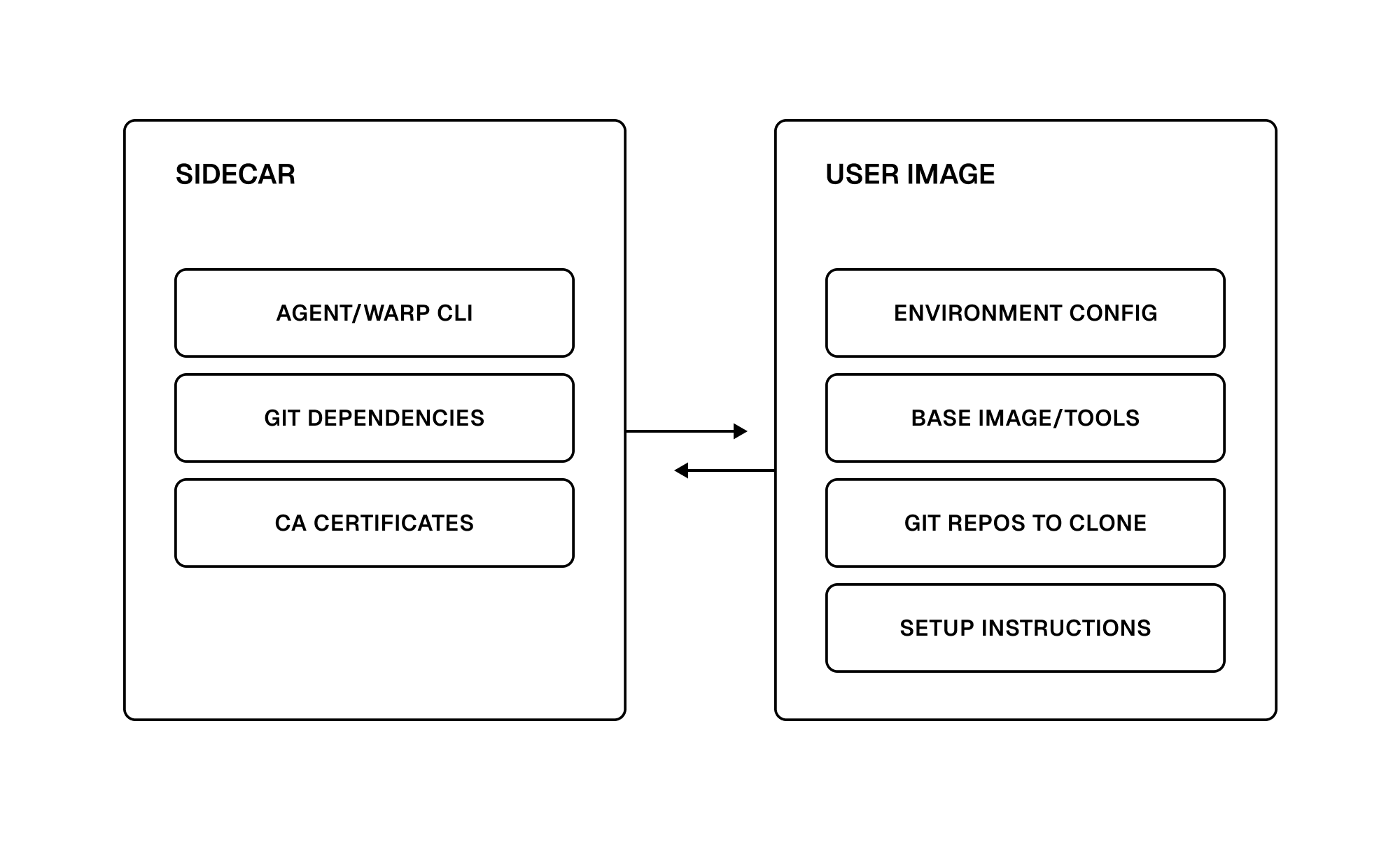
While Warp’s hosted agents only run on Linux currently, we intend to support macOS and Windows as well – please reach out if you’re interested\!
Securing cloud sandboxes
In order to do meaningful work, hosted agents need access to your codebase and other sensitive data. For this to be safe, we ensure:
- Any credentials that the agent has access to are short-lived.
- Sandboxes are fully isolated from each other, even for agents on the same team.
Each Warp team maps to a distinct tenant in Namespace’s platform. Tenants share no resources, and each tenant has its own usage limit. There’s no network connectivity between tenants, and different sandboxes within a tenant are also isolated from each other. That way, if one sandbox is compromised, it can’t affect others.
When setting up a sandbox, we inject Warp credentials and a temporary GitHub token that’s scoped to the user who triggered the sandbox. As the agent makes code changes, they’re attributed back to the user, and the agent can’t access any codebases that the user couldn’t also reach.
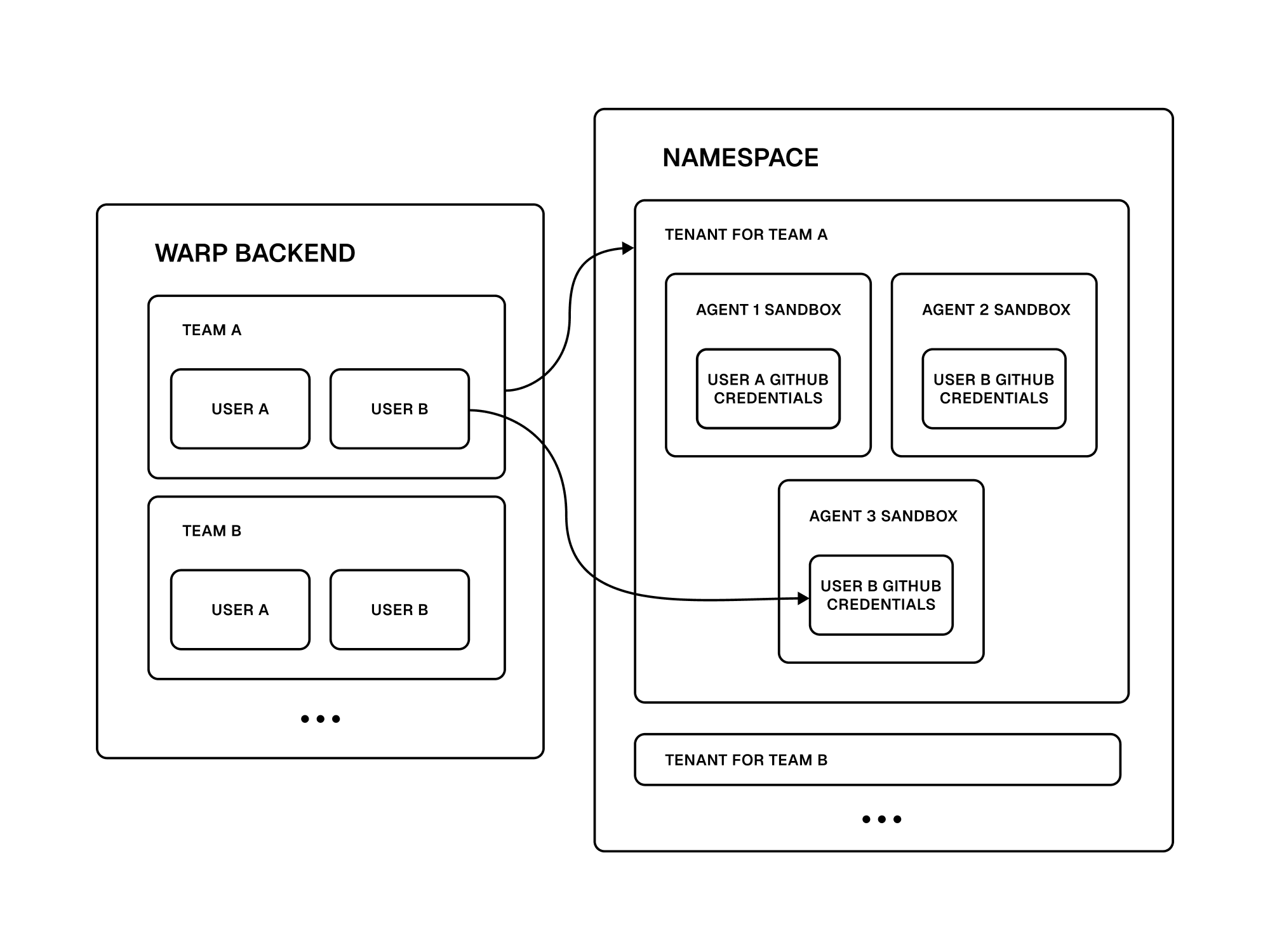
We’re continuing to work with Namespace to improve the security of hosted agents, including restricted network egress to only trusted domains.
Making cloud-hosted agents responsive
From the beginning, one of Warp’s product principles has been to Build for Speed. This carries over to cloud agents as well. Even if an agent is going to spend many minutes on a task, initial response time is important. If you assign Warp a Linear issue, you should know immediately that it has started working. Once the agent gets into your codebase and starts making changes, compile times start to add up, as anyone who’s worked on a large codebase can attest. To solve these problems, we leverage Namespace in a couple ways:
First of all, Namespace is built for performance. To cut times on build execution, Namespace has native integration with popular developer tools including Git and Docker. We were impressed by code execution times early on, and throughout the prototyping process, the team has worked with us directly to shave additional minutes off of code execution time. As we’re authoring this post, they’ve even shared areas to take seconds off of our startup time when scheduling and creating environments.
The second benefit is the quality of hardware. A common problem with cloud providers is that they use large pools of older, less-capable infrastructure, making them a poor fit for CPU-intensive tasks like code compilation. Since Namespace uses custom hardware with enterprise-grade processors, all built with CI in mind, we’re able to offer users many-core instances that can build code faster than even powerful local dev machines.
We also attach a shared cache volume to all sandboxes. Internal Warp state, like the codebase context index and cached Warp Drive data, is automatically synced into this volume so that the agent has all the context it needs right away. We’re exploring extending this cache to cover git checkouts, Docker images, and artifacts for common build tools as well. Our goal is to seamlessly provide the best development environment for the agent to work, so that you don’t have to spend time optimizing its setup.
Building an agent platform
When we started moving Warp’s agent out of the terminal and into the cloud, there were tons of unknowns. Warp was designed from the start to be a native desktop app, and making it reliably run without any user or GUI could be a blog post of its own. We knew that running remotely would introduce a whole new set of corner cases, and make debugging even trickier. Based on our experience building Warp, we know that real-world engineering teams have nontrivial setups that can’t be replicated by a simple “Hello, World” image. Throughout this process, having a robust compute platform to build on has helped tremendously, and the Namespace team has been a pleasure to work with.
It’s early days for Warp’s agent platform, and we’re excited to see where it goes. Over the next few months, expect it to become:
- More flexible, able to handle a wider range of tasks and tech stacks
- Available everywhere that developers do work
- Fully programmable, so you can build background agents for any purpose
Give our initial integrations a try, and let us know what you think.
Start your software factory
Book a demo and we’ll walk you through the workflows that map to your stack.
Related articles
Oct 15, 2026Engineering
10 min
Tactics for rolling out software factories: human and organizational changes
10 min
Oct 15, 2026Engineering
7 min
The road to self-improving software
7 min
Sep 15, 2026Engineering
12 min
Adopting the software factory model: crawl, walk, run
12 min
Sep 2, 2026Engineering
6 min
WarpBench: How we reduced our cost-per-PR 75%
6 min
Aug 27, 2026Engineering
12 min
Closing the loop with self-improving cloud software factories
12 min
