Add verification and merge risk
What we’ll cover
Teach your workers to record visual proof with computer use and assess merge risk on every pull request.
Now that we have our workers looping us in on product decisions, let's talk about the other side of the equation: the pull request.
Ideally, factory pull requests should have all the information we need to confidently hit merge after reviewing. No need to check out locally, and no high-risk blockers. That comes down to two things:
- End-to-end verification showing that the agent actually booted the app, clicked around its work, and captured visual proof.
- Merge risk assessment so we can tell at a glance which PRs are quick, low-risk merges and which ones need closer line-by-line scrutiny.
If we look through the pull requests our factory has opened so far (like the spec PR for expanding and collapsing folders, fixing the 1px border gap on the tab bar, or pasting a URL into the link popover), they explain what changed and list the static checks that ran, but we don't have visual confirmation that the changes work. A screenshot or screen recording goes much further than reading CSS or unit tests to confirm a change matches our expectations.
Prompt
Every task starts from a trigger: a chat message, a Slack mention, a GitHub comment, a Linear ticket, or wherever else. We'll set up the automations that turn these into factory tasks, with any links, logs, and screenshots attached.
Teach workers to verify their work
Let's start with verification. Since this is a full-stack app with mainly UI-focused changes, we'll ask the agent to include screenshots and screen recordings to verify its work.
We'll teach our factory how to boot the markdown app inside its cloud sandbox, click around what it built using computer use, and attach visual artifacts to the pull request.
Add the UI verification skill
In your factory definition, add a new skill at
skills/ui-verification/SKILL.md(you can click the New Skill button at the top of the editor).The contents of this skill will be tailored to our markdown app: it teaches the worker how to start the desktop app with Chrome DevTools Protocol enabled (
MARKY_DESKTOP_ENABLE_CDP=1 pnpm dev:desktop), use computer use to record the flow and take screenshots, and add a## Visual proofsection to the pull request description.Notice the
## Gotchassection at the bottom. These were accumulated over time as workers used the skill, and in Unit 3, we'll see how your factory can surface and update tips like these automatically using scoring and self-improvement.skills/ui-verification/SKILL.md --- name: ui-verification description: Prove a user-facing change works by driving the running app with computer use, and add a Visual proof section to the pull request description. --- # UI verification Use this whenever a change affects something a user can see or click. ## Start the app 1. Run `MARKY_DESKTOP_ENABLE_CDP=1 pnpm dev:desktop`. 2. Read the terminal output for: - `Playground: <path>` - `DevTools listening on ws://*********:9222/...` 3. Use the auto-opened editable playground at `apps/desktop/.dev-electron/playground` instead of file pickers or checked-in fixtures. ## Walk the path 4. Walk the exact path the request describes. For a bug, show the symptom is gone. For a feature, show the new behavior and its key interactions. 5. Use computer use to see and record the app. Prefer the Chrome DevTools Protocol endpoint for interaction-heavy steps: it can inspect DOM state, evaluate JavaScript, click controls, inspect iframe contents, and capture screenshots from the real Electron renderer. This helps when computer use has trouble interacting with the dev app window. 6. For CDP, fetch `http://*********:9222/json/list`, connect to the page's `webSocketDebuggerUrl`, and drive the renderer with DevTools Protocol commands. ## Record the proof 7. Record a video of the flow. Add a screenshot only for a final state worth inspecting closely, like a pixel-level visual fix. 8. Add a `## Visual proof` section to the pull request description: the path you walked, what each recording or screenshot shows, and the media itself. Never commit media to the branch. 9. If the app cannot launch or the path cannot be reached, say so in the Visual proof section. Never claim a verification that did not happen. 10. When you are done, stop the dev server and confirm no `Marky Dev` process remains. ## Gotchas - Build `packages/ui` and `packages/editor` first if you start the app any other way; the desktop app imports their dist output. - Screenshots are DPR 2: CSS pixels times 2. - Right clicks need real `Input.dispatchMouseEvent` events; synthetic `contextmenu` events don't open base-ui context menus. - Popup open in the DOM but missing from a screenshot? Check stacking with `document.elementFromPoint`. - xterm refits through a debounced ResizeObserver and can lag layout changes by a few seconds; re-measure before calling it a bug.Prompt the builder to verify user-facing changes
The worker can discover
ui-verificationfrom its skill description alone, but to make sure it runs consistently, let's also add an explicit line to the implementation stage instages/implement.mdand remove theSkip computer use verification.instruction we added in Lesson 1. In Warp Factories, workers already have built-in computer use tools inside their sandboxes, so there's nothing extra to enable.stages/implement.md+3−1 # Implement Implement the change as described, and use static checks to verify your work. Skip computer use verification.Implement the change as described, and use static checks to verify your work. When there is an approved spec, implement it on the spec's branch and pull request; its validation section is your checklist. Link the pull request on the issue. For any change a user can see, also follow skills/ui-verification/SKILL.md and add its Visual proof section to the pull request description.Run visual verification on existing PRs
To test it out, start a new factory task in New Chat and pass in a couple of the pull requests from earlier that benefit from visual verification, such as fixing the 1px border gap on the tab bar and fixing clipboard paste in the link popover.
If you click into the builder worker while it runs, you'll see it call on a computer use subagent to navigate the app and capture screenshots and screen recordings. You can view all of these captures in the Artifacts panel at the top of the run view, as well as in the
## Visual proofsection on each pull request. You should see results like this:- 1px border gap fix: Instead of reading through CSS to guess whether the corner looks right, you get a zoomed-in screenshot showing the rounded edge is cleanly fixed.
- Link popover paste bug: You get a screen recording with cursor clicks highlighted, proving end-to-end that the worker copied a URL into the system clipboard, opened the link popover, and pasted over the existing link.
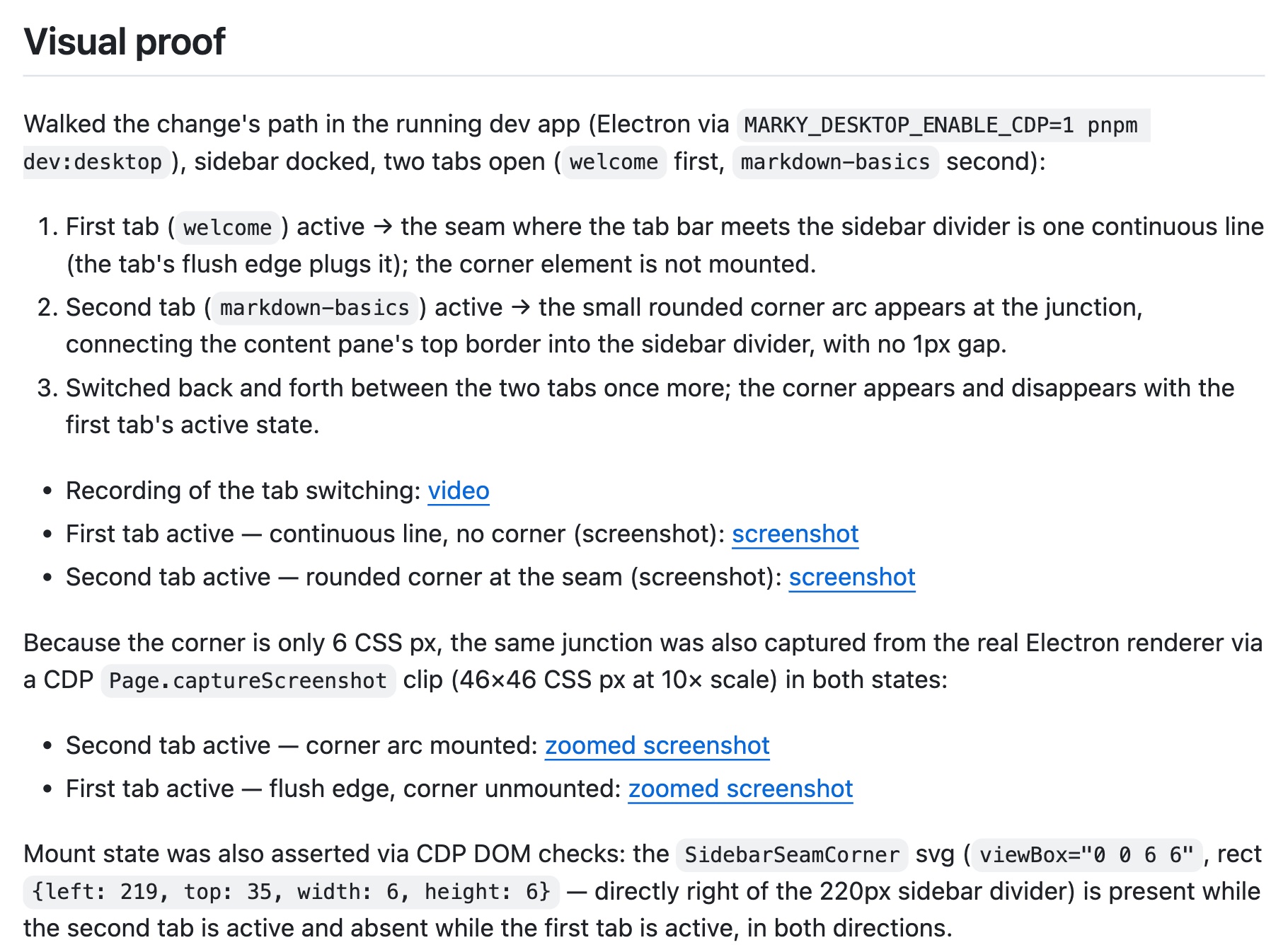
Verification evidence attached to the pull request.
Assess merge risk on every pull request
Now that our workers are verifying their work visually, let's tackle the second piece of reviewing at scale: merge risk assessment.
Looking at a list of open pull requests, it's hard to know which ones are quick reviews and which ones need careful scrutiny. Take the PR from our backlog that scopes terminal tabs to individual document tabs. Because that changes user behavior and muscle memory, we want to know:
- What is the blast radius across the codebase?
- What is the rollback cost? Can we revert it in a single commit, or could it break state stored on a user's machine?
- If something breaks in production, will our error monitoring catch it?
Let's teach our workers how to evaluate and mitigate risk before handing off a pull request.
Add the merge-risk skill
Add a new skill for assessing merge risk at
skills/merge-risk/SKILL.md. This teaches the worker to evaluate a change across five categories:- Alignment: Does the code match the PR description and issue, or did the worker include undocumented drive-by changes?
- Impact: What is the blast radius (for example, an isolated view vs. a shared component library), and does it touch sensitive areas like auth, permissions, or database schemas?
- Verification: Was the behavior verified with computer use, end-to-end tests, and unit tests?
- Rollback cost: Is this a two-way door (easy commit revert or feature flag) or a one-way door (destructive schema change or broken persisted state)?
- Error detection: If something goes wrong in production, will it report to monitoring or logs, or are errors silently swallowed?
skills/merge-risk/SKILL.md --- name: "merge-risk" description: "Use when assessing the risk of merging a PR" --- Output format: ``` **Merge risk: <low-medium-high>** **<category>:** <verdict> <list gaps that increase risk. Use bullets, keep succinct. Include links to relevant files as needed> <...list all categories> ``` These are the **categories** and **verdicts** that affect risk, with descriptions of what "low risk" means: - **Alignment (poor ⚠️ / decent 👀 / good ✅):** Code aligns with the description and source issue, when present. Behavior assumptions and drive-bys must be documented. - **Impact (large ⚠️ / medium 👀 / small ✅):** Scope is contained and away from sensitive code paths. - Consider blast radius: potential impact or scope of the changes introduced by this PR. Consider all possibilities. Examples are layout shift, breakages for consumers, mobile responsiveness, etc. - Sensitive areas carry outsized risk regardless of diff size: auth, permissions, payments, PII, secrets, data migrations, dependency bumps, and infra or config changes. Flag any that are touched, and call out anything that widens access, weakens validation, or logs sensitive data. - **Verification (poor ⚠️ / decent 👀 / good ✅):** Behavior is verified, where applicable. - Changes to the user experience **need** end-to-end proof as screenshots or recordings. Changes that could meaningfully affect performance **need** profiling. Prefer before-and-after evidence to standalone proof. When this coverage is lacking, it's a failure. - Edge cases must be tested, or documented when they aren't; review the code closely and link the user to relevant code when only documentation is present. - **Rollback cost (high ⚠️ / medium 👀 / low ✅):** The code is reversible once merged. Consider one-way vs. two-way doors. You can walk back through two-way doors, but not one-way doors. A PR that is cheap to roll back is lower risk. Changes that involve destructive actions or hard-to-reverse decisions are one-way doors. - **Error detection (poor ⚠️ / decent 👀 / good ✅ / N/A ✅):** If applicable, critical flows should be monitored; If this breaks in production, someone should find out before users report it. Look for swallowed errors or fallbacks that hide breakage. Generate a risk score for merging this PR on a scale of low - medium - high. Verdicts: - ⚠️ = 3 - 👀 = 2 - ✅ = 1 Weights: - Impact = 2x - Verification = 2x - Rollback cost = 1.5x - Error detection = 1x - Alignment = 1x Score = Σ(score × weight) / Σ(weights). - low: < 1.5 - medium: 1.5 – < 2.25 - high: ≥ 2.25 Keep the numerical score and its calculations internal; do not include them in the output.Update the implement prompt to mitigate and report risk
Next, update
stages/implement.mdto instruct the builder to runmerge-riskbefore opening a PR so it can proactively mitigate any risks it finds (for example, adding error logging if error detection is weak), and to include Impact and Rollback cost sections right in the PR description:stages/implement.md+4 For any change a user can see, also follow skills/ui-verification/SKILL.md and add its Visual proof section to the pull request description. Before opening a PR, use skills/merge-risk/SKILL.md to mitigate risk ahead of PR, if possible. Report the "Impact" and "Rollback cost" as sectioned headings in the PR, with a **Verdict** matching the risk for that category, and a brief summary for each.Assess risk on your open PRs
Save your changes, then start a chat with your factory and ask it to assess risk across a few previous factory tasks. We'd suggest Scope terminal tabs to individual document tabs and Expand or collapse all sidebar folders.
The worker should come back with an inline risk breakdown and updates to both pull request descriptions. In our testing, these were the assessments we received:
- Scoped terminal tabs: Even though it sounded high-impact, the assessment shows a low rollback cost and a well-contained blast radius, while flagging if end-to-end computer use verification hasn't been run on that branch yet.
- Expand or collapse sidebar folders: The risk assessment flags a real verification gap: our worker ran on a Linux cloud runner, whereas the native
Viewapplication menu bar only renders on macOS! That immediately tells us we either need to test that menu locally on a Mac or configure a macOS runner for verification.
Clicking into the updated pull requests, you'll now see Visual proof, Impact, and Rollback cost sections right in the description, giving you a clear paper trail to review and merge faster.
- factory.yaml
- workers/foreman/worker.md
- workers/builder/worker.md
- automations/github-issues/automation.md
- stages/triage.md
- stages/spec.md
- stages/implement.mdverification and merge-risk added
- skills/ui-verification/SKILL.mdnew
- skills/merge-risk/SKILL.mdnew
With visual verification and merge risk in place, our pull requests are much easier to review and merge. Next, let's go a step further and have the factory proactively discover bugs on its own without waiting for someone to file an issue or send a prompt.